
How to Choose the Best IT Vending Machine?
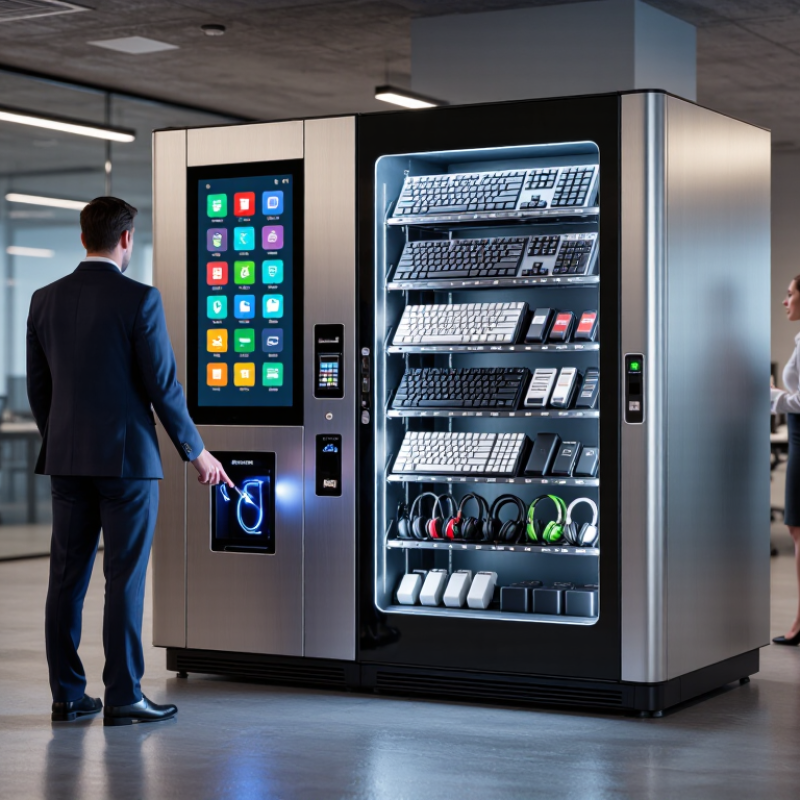
Choosing the best IT Vending Machine requires more than comparing prices or counting product slots. The right model should solve a clear workplace problem: fast access to keyboards, chargers, cables, adapters, headsets, and other approved IT essentials. It should also protect inventory, record every transaction, and connect with your support or asset-management workflow.
Rob England, a respected IT service-management author, offers a useful reminder: “The customer doesn’t care about your process; they care about the outcome.” That principle applies directly to an IT Vending Machine. Employees care about receiving the correct item within minutes, without waiting for a ticket response or visiting a storage room. IT teams care about visibility, cost control, and fewer repeated support requests.
Look closely at real operating conditions. A busy office may need a large touchscreen, badge authentication, and remote stock alerts. A small site may value a compact cabinet and simple cloud reporting instead. Check item compatibility, payment or access options, warranty coverage, software security, and refill procedures. Small details matter. A jammed dispensing slot can damage confidence quickly.
There is no perfect machine. That is worth admitting. Some buyers focus heavily on appearance, then overlook integration or maintenance. Others choose the lowest price and face limited reporting later. The strongest decision comes from testing the machine with real users, reviewing several weeks of demand, and measuring the full ownership cost before purchase.
Define Your Organization’s IT Equipment and Access Needs
How to Choose the Best IT Vending Machine?
Define Your Organization’s IT Equipment and Access Needs
An effective IT vending machine starts with a clear picture of daily equipment demand. Review help-desk tickets, onboarding records, and replacement data from the past six months. Count common items, such as keyboards, chargers, headsets, adapters, and preconfigured laptops. Separate urgent replacements from routine requests. They need different storage and approval rules.
Map access by role and location. A remote employee may need a secure pickup point near reception, while a technician may require controlled access to higher-value devices. Record working hours, shift patterns, and accessibility requirements. Authentication can use employee credentials, a verified code, or manager approval. Keep every transaction traceable. Collect only necessary user information, and follow internal security and privacy policies.
Physical details matter too. Measure available floor space, power access, network coverage, lighting, and nearby camera visibility. Choose compartments that fit actual equipment, not idealized boxes. An early estimate may be wrong; one oversized laptop package can waste several small slots. Pilot the machine with a small team for four weeks. Track failed pickups, empty compartments, return delays, and items people still request from support staff. Adjust the inventory after observing real behavior. Perfect planning is unlikely.
| Organization Profile | Typical Access Environment | Common IT Equipment Needs | Estimated Monthly Demand | Recommended Machine Capacity | Access and Security Requirements | Recommended Replenishment |
|---|---|---|---|---|---|---|
| Small Office (Up to 50 employees) |
Single office location with controlled business-hour access | Keyboards, mice, headsets, power adapters, cables, laptop sleeves and USB storage devices | 10–30 items | 20–40 compartments with a compact footprint | Employee badge or PIN access; basic inventory tracking | Every 4–6 weeks |
| Growing Office (51–250 employees) |
Several departments sharing one or two office sites | Docking stations, chargers, webcams, keyboards, mice, replacement cables and ergonomic accessories | 30–80 items | 40–80 compartments with configurable product slots | Individual user authentication, approval rules and usage reports | Every 2–4 weeks |
| Large Enterprise (251–1,000 employees) |
Multiple floors, buildings or regional offices | Peripherals, mobile device accessories, adapters, replacement power supplies and preconfigured endpoint accessories | 80–200 items | 80–150 compartments with remote inventory monitoring | Badge integration, department-level permissions, audit logs and automated alerts | Weekly or biweekly |
| 24/7 Operations (Operations, logistics or support teams) |
Continuous access in facilities operating around the clock | Rugged keyboards, barcode scanners, handheld device batteries, charging cables, protective cases and replacement peripherals | 100–300 items | 100–200 compartments with high-availability storage | 24/7 access, badge authentication, emergency access controls and real-time alerts | Several times per week or based on usage thresholds |
| Educational or Training Site | Shared computer rooms, libraries, laboratories or training centers | Headsets, mice, keyboards, chargers, presentation adapters, HDMI cables and basic computer accessories | 50–150 items | 50–100 compartments with clear product labeling | Student or staff identification, borrowing limits and return tracking where applicable | Weekly or biweekly |
| Healthcare or Regulated Facility | Restricted clinical, laboratory or administrative areas | Disinfectable keyboards and mice, approved cables, chargers, scanners and department-specific accessories | 40–120 items | 40–100 compartments using easy-clean materials | Role-based access, detailed audit trails, tamper monitoring and controlled item approval | Weekly, with compliance checks |
| Remote or Distributed Workforce | Several smaller offices, satellite sites or employee service points | Chargers, adapters, webcams, headsets, cables and replacement laptop accessories | 20–70 items per location | 20–60 compartments per site; modular deployment preferred | Cloud-based management, centralized reporting and location-specific permissions | Every 2–4 weeks, adjusted by site demand |
| High-Security Environment | Restricted facilities with controlled equipment handling | Approved peripherals, encrypted storage devices, specialized adapters and serialized replacement equipment | 20–100 items | 30–80 secured compartments with limited product visibility | Multi-factor authentication, authorization workflows, full transaction history and video coverage | Weekly or according to approved access schedules |
Related Posts
-
China Top 10 Snack Vending Machine Manufacturers?
-
How to Start a Food Vending Business in 2026?
-
How to Choose an IT Vending Machine for Your Business?
-
How to Choose an Inventory Vending Machine in 2026?
-
Top 10 Snack Machine Manufacturers from China at the 137th Canton Fair
-
2026 Top Vending Machine Leasing Trends You Need to Know?